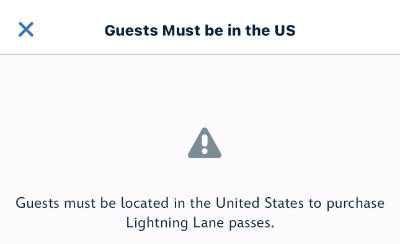
Unfortunately, it was then confirmed that UK Guests Will NOT Be Able To Book Their Lightning Lanes In Advance. While Disney since has since loosened the restrictions, there are still some workarounds to use if you're having issues. There is no hard and fast way to get around it to book your Lightning Lanes, and sadly not all methods work for everyone.
Will A VPN Work?
A VPN might work, but alone it's unlikely for most people. Our guide "How To Use a VPN To Make Walt Disney World Bookings" covers everything you need to know about making Walt Disney World bookings online from the UK using a VPN, however, simply using a VPN to trick your location isn't going to be enough a lot of the time. The reason for this is that apps on your phone have access to GPS and more that web browsers do not so they can use other methods to discover your location. This wasn't an issue back in the day when choosing your Fastpass+ selections because you could do it on the web (not that there was a location lock on it).
It appears to be quite random which tricks allow the Lightning Lane selections to appear, as testing and reports seem to differ from person to person. We'll walk you through things to try to see if any work for you, starting with the simplest to the most complicated.
First Solution
- Open My Disney Experience app
- Tap the hamburger (3 lines) on the bottom right
- Scroll down and tap on "Profile"
- Then tap "Account Settings
- Change your country of residence to the United States. The Scroll down and tap DONE.
- Close the app and reopen it
Second Solution
Keep your My Disney Experience profile country of residence to the USA and follow the below steps.
- Turn Off Location (settings app > privacy & security > location services > Off)
- Turn On Aeroplane Mode (keep Wifi on)
- Close the app and reopen it
- If that still doesn't give you access, then connect your device to a VPN at any location in the USA
Booking Lightning Lanes (Android)
A workaround on Android phones seems to be easier due to the more open nature of the operating system. There are apps you can download which are GPS spoofers which, as you can guess, make your GPS location appear elsewhere. This is different than a VPN because a VPN just alters your IP address (which works for web browsing) but the My Disney Experience app uses GPS on your device to get your location. Installing a GPS spoofer, and setting it to somewhere in the USA should allow you onto My Disney Experience to book your Lightning Lanes. A VPN might also be required to be active as well. Warning: We cannot recommend any specific GPS spoofer apps as we cannot verify any of their legitimacy or safety.
Booking Lightning Lanes (iPhone/iOS)
Booking on iPhones (iOS) is a bit more tricky because Apple does not let apps spoof your GPS location, so the Android method above will not work on iOS. Unfortunately, there is no hard or fast rule to make it work for everyone, and people have had varied success getting it to work. Some people have tricked the app by just turning off location settings, but for most others, a few more steps are needed. We will outline all the steps you can try below.
- Install a VPN if you haven't already
- Open My Disney Experience App, tap the hamburger menu, scroll all the way down to privacy & legal, google maps settings, and disable Google Maps
- Fully close the My Disney Experience App
- Turn Off Wifi (in the settings app, not the control centre pull-down)
- Turn Off Location (settings app > privacy & security > location services > Off)
- Hard reset your phone (click up volume then click down volume then hold the side button for 15 seconds until the white Apple logo appears)
- Connect to a USA location in your VPN app
- Open My Disney Experience App and go onto the Lightning Lane section
If No Solution Works For You
If none of that works for you, don't feel bad. A lot of people still won't get access and it seems random why some devices can trick My Disney Experience location and not others. While I hope that Disney comes up with a solution to allow all guests to book Lightning Lanes, for now, we only have these methods.
Worst-case scenario, you will have to wait until you arrive in the US. For guests staying 2 weeks, this means when you arrive you will get first pick of your second week (as you can book 7 days in advance for your whole trip) so depending on how many days you plan to purchase Lightning Lanes, it'll probably be best to plan your second week for most of those days. You will be able to purchase Lightning Lanes for your first week (and even the day you arrive) but it's unclear what inventory will be left as guests have been booking up the popular rides over the previous 7 days in their booking window.